How do you learn from practice exam mistakes?
After a practice exam, make one flashcard for every question you missed or guessed. Write the car...
By Kamil
8 mins read
After a practice exam, make one flashcard for every question you missed or guessed. Write the card about the fact the question tested, and note why the wrong option looked right to you.
Then review those cards on a spaced schedule until the next practice exam, so the right answer is still there in a month.
Why a missed question can leave the wrong answer behind
Multiple-choice tests help you remember the facts they ask about, but they have a cost. Roediger and Marsh had students take a multiple-choice test on facts and then a later recall test. The earlier test helped a lot overall. Students who had read more wrong options produced more of those wrong options as answers on the later test (Roediger & Marsh, 2005). Marsh and colleagues reported the same pattern: wrong options picked up from multiple-choice tests showed up again on later tests. The authors still judged that the benefits of testing outweigh this cost (Marsh et al., 2007).
Certification exams write their wrong options to be picked. The official AWS Certified Cloud Practitioner exam guide describes them as plausible answers that a candidate with incomplete knowledge might choose.
Feedback reduces the damage. In a study by Butler and Roediger, students took a multiple-choice test with immediate feedback, delayed feedback or none. On a later recall test, both kinds of feedback raised the number of correct answers and cut the number of wrong options students gave as answers (Butler & Roediger, 2008). Reading the answer key once after the exam counts as feedback. A card goes further, because you have to recall the correct answer on your own several more times.
Count your guesses as mistakes
A lucky guess scores the same as a known answer, so the score report hides it. During the practice exam, mark every question you were unsure of, with the flag in the practice tool or a note on scrap paper.
Those guesses deserve cards too. Butler, Karpicke and Roediger had people rate their confidence for each multiple-choice answer. For correct answers given with low confidence, feedback doubled how many were kept until the final test (Butler, Karpicke & Roediger, 2008).
Feedback seems to matter little for answers you already knew. In an experiment with foreign word pairs, getting the correct answer after a wrong response improved learning and retention a week later. Feedback after a correct response made little difference (Pashler et al., 2005). That study used vocabulary rather than exam questions. Still, it suggests you spend your cards on the misses and the guesses and skip the questions you knew.
Write the card about the tested fact
Do not copy the practice question onto a card. Question banks are copyrighted, and the real exam will ask about the same fact in different words, so the wording you memorise will not help you. Ask yourself what one fact or rule the question tested. Write that fact as a short question you answer from memory, with no options to pick from. Seeing four options and recognising one is easier than producing the answer yourself.
Then write in the notes why the tempting option is wrong, so the lure and the reason against it sit on the same card.
Three example cards I wrote for this article, for an AWS cloud exam:
| Front | Back | Notes |
|---|---|---|
| Which AWS service is a managed relational database? | Amazon RDS | I picked DynamoDB because it is also managed, but DynamoDB is a NoSQL database, not a relational one. |
| Under the shared responsibility model, who patches the guest operating system on an EC2 instance? | The customer | I picked AWS. AWS looks after the hardware and the virtualization layer; the operating system on the instance is mine. |
| Which AWS service caches content at edge locations close to users? | Amazon CloudFront | Guessed. Route 53 also runs at edge locations, but it is DNS: it tells users where to go and does not cache files. |
In OxyLesson, open New card
and keep Basic
. Type the question in Front
, the answer in Back
and the I picked...
line in Notes
. In Tags
, type practice-exam-1 and press Enter, then add mistakes. Press Freeze
next to Tags
and save with Save and add next
, and the next card starts with the same two tags. On the review answer, the notes show under Note
, so every time you see the answer you also see why the wrong option was wrong.
For more on writing a card that holds one fact, see How to create effective flashcards.
Let an assistant type the cards
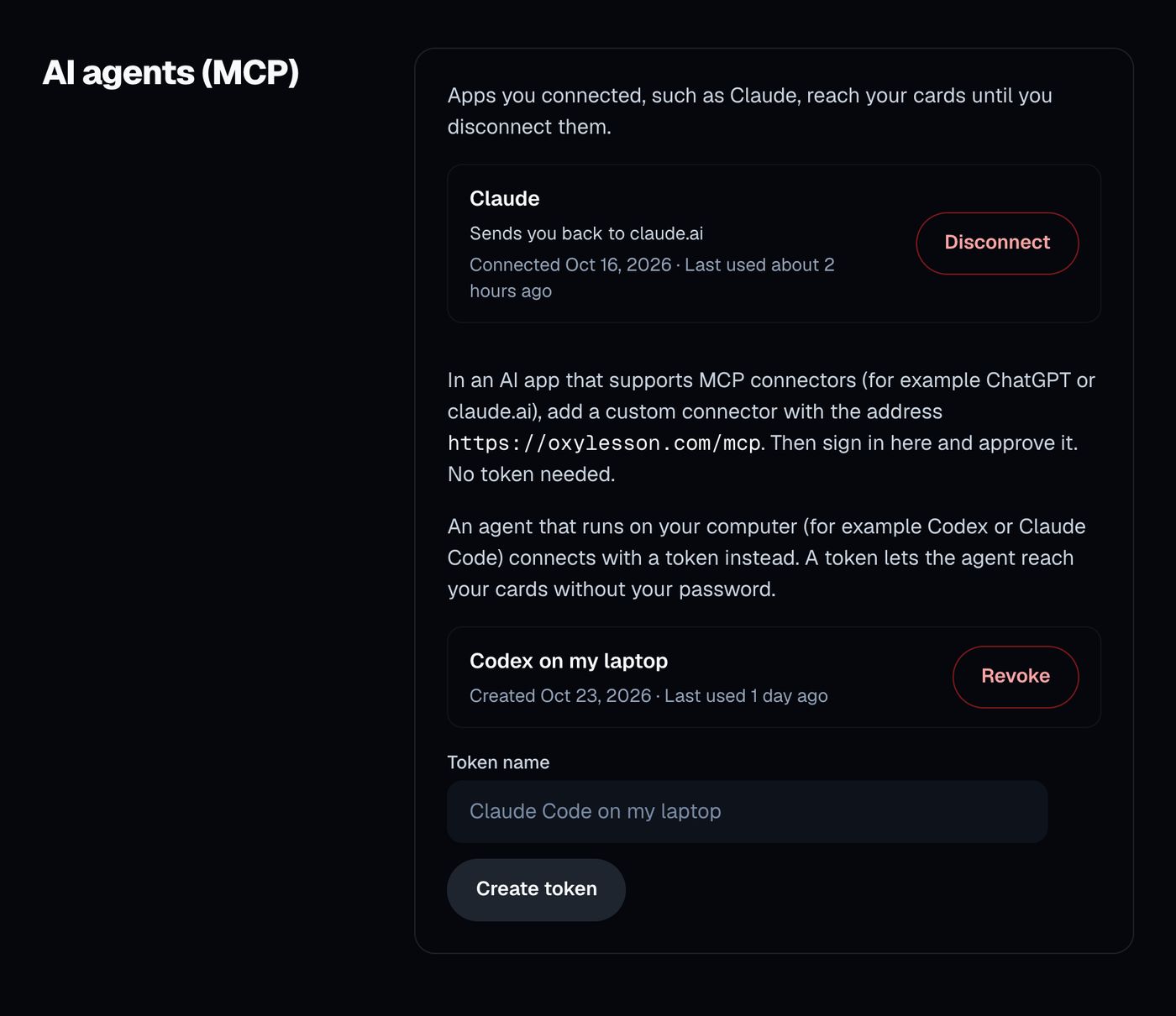
Through OxyLesson's MCP connector, Claude, ChatGPT or a coding agent can add the cards for you. You add it once in the AI app as a custom connector with the address https://oxylesson.com/mcp. The account page section AI agents (MCP)
shows the steps, and How to create flashcards with AI in OxyLesson covers the setup.
Give the assistant your own list, one line per miss: the topic, what you picked and what was right. Then ask, for example:
For each line, create one OxyLesson card. Front: a short question about the fact, without answer options. Back: the correct answer. Notes:
I picked ..., but ...in one sentence. Tag every cardpractice-exam-1andmistakes.
The connector skips a card when you already have one with the same front and back, so sending the request twice makes no duplicates. Two differently worded cards on one topic both get saved, though. Read each new card in the library afterwards. An assistant can get a fact wrong, so check any answer you are unsure of against the official documentation.
Review only the mistakes
In the library, click the mistakes tag chip, press Study
, keep Front → Back
in Choose review mode
and press Start review
. With a tag selected, the review uses only the cards with that tag. Select practice-exam-1 as well and you get only the mistakes from that one exam, because selected tags must all match.
A review shows only cards that are due. New cards are due at once, and after that FSRS spaces each card on its own schedule. OxyLesson has no study-ahead mode and no setting for an exam date, so add cards from each practice exam the same day and give them a few weeks. How to learn effectively using OxyLesson explains why a few days are too few.
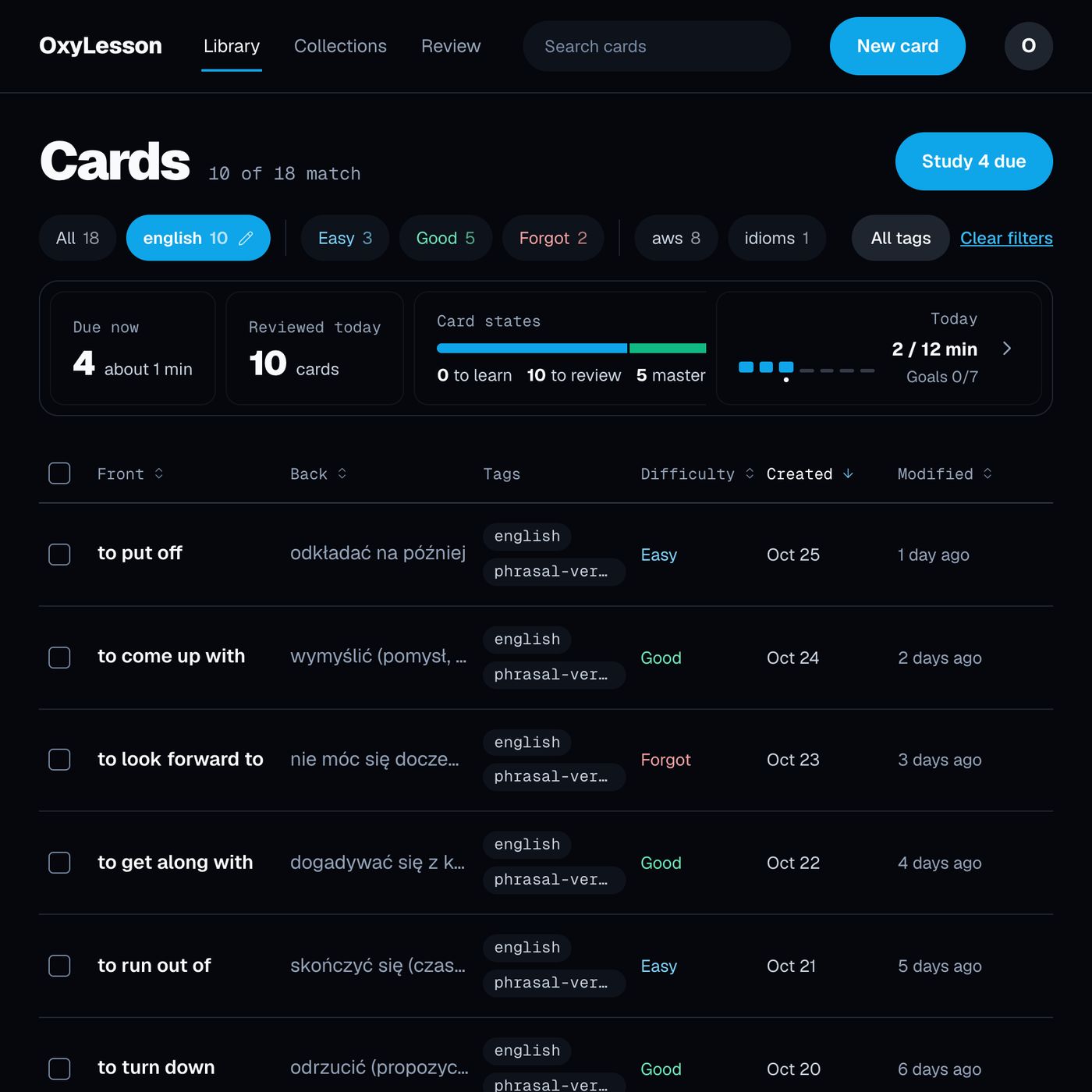
The difficulty chips next to the tags find the cards that keep failing. The Forgot
chip does not mean your last answer was wrong. It lists the cards with the highest FSRS difficulty, the ones you have graded Hard
or Forgot
often enough for their difficulty to climb.
Before the next practice exam
After the second practice exam, tag its cards practice-exam-2. If a topic you already have a card for comes up as a miss again, rewrite that card, or add a second one that asks about the same fact from another side. On the review answer, Help me understand
gives a short explanation with an example, and Save as note
keeps it on the card. Check it as you would any other AI text.
The same method works for errors outside exams, such as mistakes in a language you are learning. That case is covered in How do you learn from your mistakes in a foreign language?
Sources:
- Butler, A. C., Karpicke, J. D., & Roediger, H. L. (2008). Correcting a metacognitive error: Feedback increases retention of low-confidence correct responses. Journal of Experimental Psychology: Learning, Memory, and Cognition, 34(4), 918-928. https://doi.org/10.1037/0278-7393.34.4.918
- Butler, A. C., & Roediger, H. L. (2008). Feedback enhances the positive effects and reduces the negative effects of multiple-choice testing. Memory & Cognition, 36(3), 604-616. https://doi.org/10.3758/mc.36.3.604
- Marsh, E. J., Roediger, H. L., Bjork, R. A., & Bjork, E. L. (2007). The memorial consequences of multiple-choice testing. Psychonomic Bulletin & Review, 14(2), 194-199. https://doi.org/10.3758/bf03194051
- Pashler, H., Cepeda, N. J., Wixted, J. T., & Rohrer, D. (2005). When does feedback facilitate learning of words? Journal of Experimental Psychology: Learning, Memory, and Cognition, 31(1), 3-8. https://doi.org/10.1037/0278-7393.31.1.3
- Roediger, H. L., & Marsh, E. J. (2005). The positive and negative consequences of multiple-choice testing. Journal of Experimental Psychology: Learning, Memory, and Cognition, 31(5), 1155-1159. https://doi.org/10.1037/0278-7393.31.5.1155
- Amazon Web Services. AWS Certified Cloud Practitioner (CLF-C02) exam guide. https://docs.aws.amazon.com/aws-certification/latest/cloud-practitioner-02/cloud-practitioner-02.html
Cover photo by eslfuntaiwan on Pixabay.