How to learn effectively using OxyLesson
Add only the cards you need, review every day that cards are due, and grade each answer honestly;...
By Kamil
Updated
4 mins read
Add only the cards you need, review every day that cards are due, and grade each answer honestly; OxyLesson's scheduler decides when each card comes back. The rest of this guide shows how each of those steps looks in the app during your first week.
Day one: add a small first batch
Start with 20 to 30 cards on one topic you are studying right now. A small batch lets you see how the reviews feel before you commit to hundreds of cards. In the app, Add new
offers four ways to add cards:
Enter manually
opens the card form. Choose Basic for a question and answer, or Cloze to hide words inside a sentence with{{c1::word}}.Explore collections
opens ready-made decks, mostly short English word and phrase lists. Pick the front and back languages, give the cards at least one tag, select the cards you want and pressImport selected
. Translations missing for your language are filled in by machine translation, so read them once.Import Anki, TXT or CSV
takes a file or pasted lines in the formatfront;back;notes;tags.Import from a movie
turns an.srtsubtitle file into cards built from the film's lines.
Tag every batch. Tags are how you study one exam topic or one chapter at a time later.
Every day: review what is due
Open the review and choose the direction: Front → Back
, Back → Front
or Random
. If you set tags in the library, only cards from those tags are used. Then press Start review
.
Try to recall the answer before you reveal it, then grade yourself with one of four buttons: Easy
, Good
, Hard
or Forgot
.
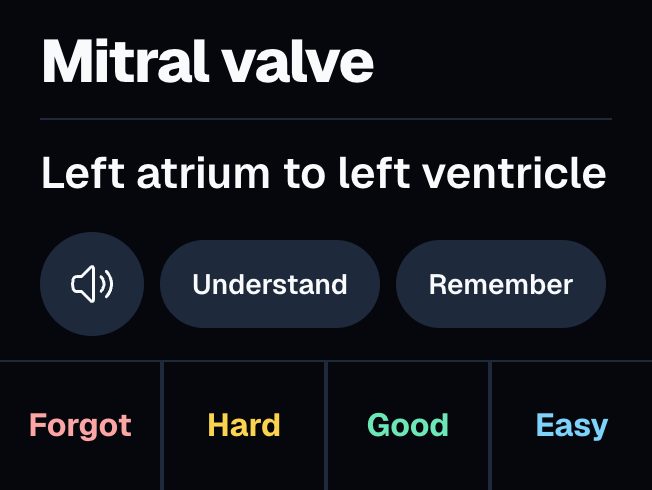
Pressing Forgot
when you blanked is the most useful habit to build. A card graded Good
by mistake comes back too late, and you lose it again.
OxyLesson schedules cards with FSRS, an open-source algorithm that estimates how likely you are to remember each card and brings it back before you are likely to forget it. Cards you know well come back after longer and longer gaps, and cards you forget come back soon. You do not set intervals yourself.
When you finish, Session done
shows how many cards you reviewed today, how long you studied, your streak and when the next card is due. Review all due
starts another round if more cards have become due.
When a card will not stick
Some cards you forget again and again. On the answer side, Help me understand
opens a short explanation with an example sentence, and Help me remember
suggests a memory hook. Save as note
keeps the text on the card for next time.
Often the card itself is the problem. If the back holds three facts, split it into three cards. If two cards look almost the same, add a detail that tells them apart. A short answer you can say in a few seconds is easier to recall than a paragraph.
By the end of the week
Check the library. Filtered by one tag, it shows how many cards are due, how many you have mastered and your streak:
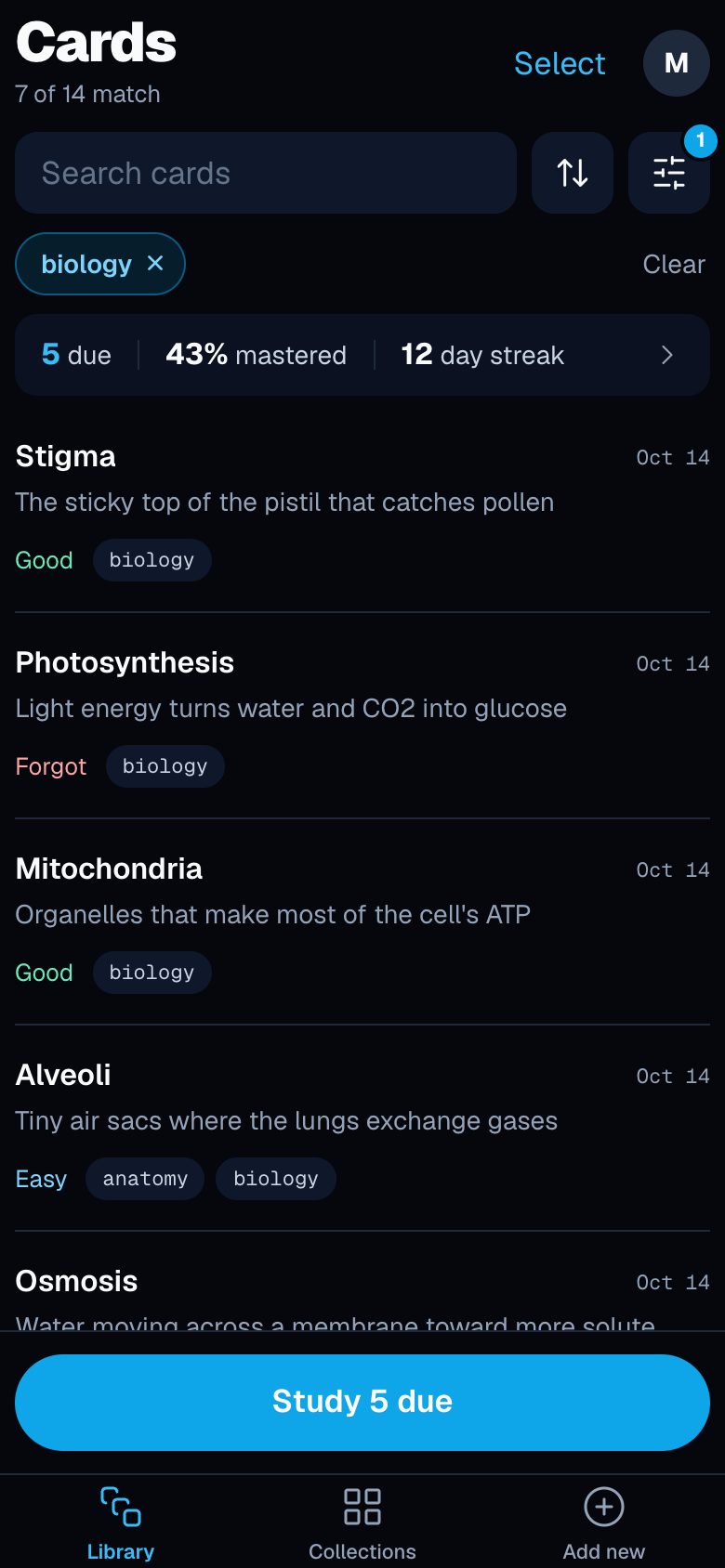
The difficulty chips (New, Easy, Good, Forgot) show where your cards stand, and filtering by Forgot
shows the cards worth rewriting. Add the next batch only when the daily reviews feel manageable. New cards add to tomorrow's reviews, so a big import on a busy week leads to a backlog.
If you prepare for an exam on a fixed date, start weeks ahead. Three days before the exam there is no time left to space the reviews out.